
VHS tapes weren’t designed to last forever. In fact, the magnetic tape inside them starts degrading the moment they’re recorded. Color bleed, color loss, tracking errors, and the dreaded “snow” — all signs your tapes are actively deteriorating. If you’ve got a closet full of camcorder footage, birthday parties, and family events recorded on VHS, Hi8, Betamax, or any analog format, every year that passes brings you closer to losing those memories permanently.
A video-to-digital converter is the bridge between your old analog world and modern digital storage. Once your tapes are digitized, you’ll want to scan your old photos too — both projects go hand in hand. It captures the analog signal from your tape and converts it to a digital file — MP4, MOV, or whatever format you choose — that you can save to a hard drive, upload to YouTube, or share with family.
Understanding Your Tape Types
Before buying a converter, know what you’re working with. The three most common home video formats are:
VHS and VHS-C: The classic. Full-size VHS tapes and the smaller VHS-C (Compact) used in camcorders. VHS-C adapters let you play VHS-C tapes in a regular VCR. Both output composite video — the yellow RCA connector standard. Quality maxes out at about 240p-330p horizontal resolution, which looks notably soft by modern standards but is all we’ve got from these formats.
Hi8 and 8mm: Better quality than VHS, especially later Metal Hi8 tapes. Used extensively in camcorders from the late 80s through the 2000s. Outputs composite or S-Video depending on your camcorder and deck. S-Video (the round 4-pin connector) produces noticeably better results than composite if your capture device supports it.
Betamax: Sony’s format that lost the format war to VHS but had slightly better picture quality. Less common, but if you have Betamax tapes they’re worth preserving. Requires a Betamax VCR, which are increasingly hard to find in working condition.
How Video Capture Actually Works
Here’s the chain: Analog Source (VCR/Camcorder) → Capture Device → Computer/Storage. The quality you get depends on every link in this chain. Your old VCR or camcorder is doing the heavy lifting on the playback side — if it’s worn out, tracking badly, or has dirty heads, your digital capture will inherit those problems.
Before you capture, clean and play your tapes. Use a wet cleaning kit on your VCR heads if you can find one. Let the tape run for a few minutes to stabilize the tape path. A well-maintained VCR can make a night-and-day difference in capture quality.
On the capture side, you have three broad categories of devices:
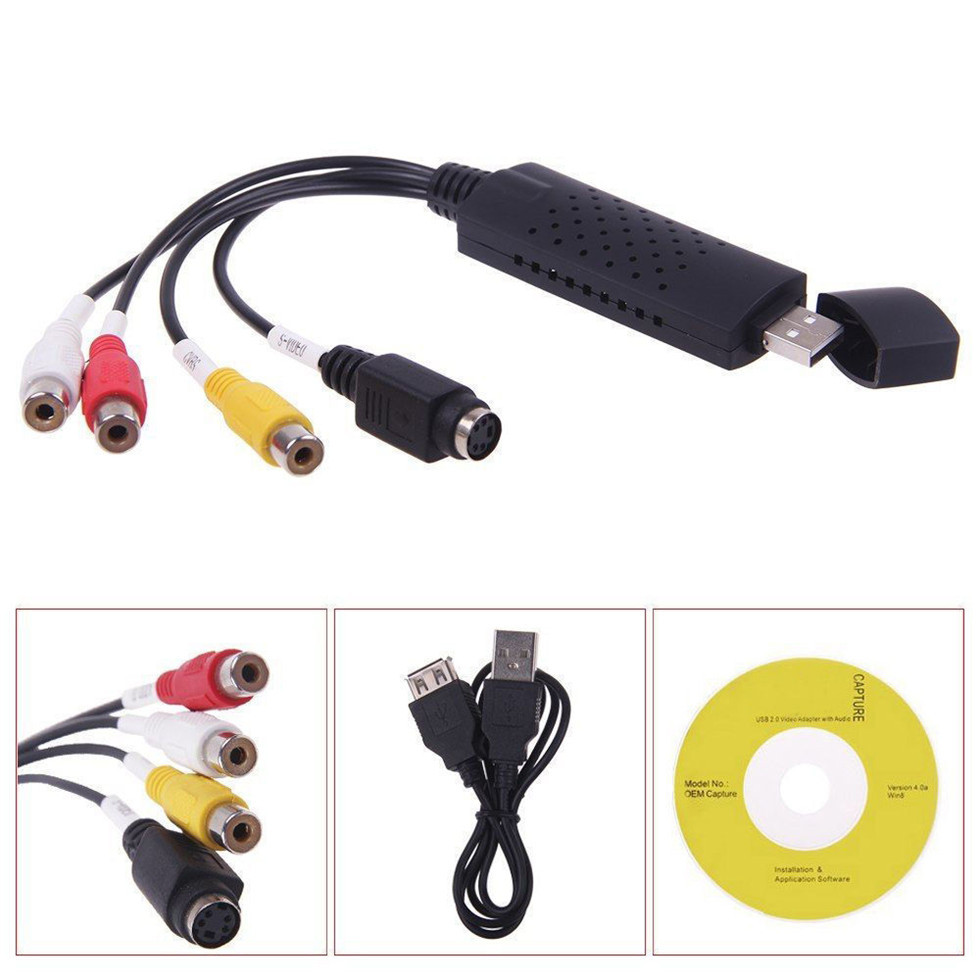
USB Capture Dongles (e.g., Elgato Video Capture): The easiest option. Composite or S-Video input, USB output to your computer. The software handles encoding. Good enough quality for most people and dead simple to use.
Standalone Recorders (e.g., ClearClick Video Capture): Record without a computer. Output to USB thumb drive or SD card. More convenient for batch converting but typically produces slightly lower quality than computer-based capture because the encoding hardware is less powerful.
Professional Capture Cards (e.g., StarTech): Higher quality components, more input options (often including S-Video), but require more technical knowledge to operate. Worth it if you’re converting dozens of tapes and want the best possible result.
The Best Video to Digital Converters for 2026
Best Overall: Elgato Video Capture
The Elgato Video Capture is the category-defining device for a reason: it just works. Connect your VCR or camcorder via composite (RCA) or S-Video output, plug into your computer’s USB port, install the software, and you’re capturing. The included software walks you through the process and outputs to MP4 — no codec headaches.
Elgato’s advantage is software quality. The capture software is straightforward, handles source selection cleanly, and produces clean encodes without the artifacts that plague cheaper solutions. It captures at 640×480 for NTSC sources, which is the correct resolution for VHS — VHS was never HD, and upscaling to 1080p just adds fake detail that looks worse than native 480p.
The main limitation: it requires a computer to run. Your computer must be on and capturing during the entire tape playback. For a two-hour VHS, that’s two hours of computer time. The ClearClick Video Capture solves this if you need standalone operation.
Price: ~$80-100 on Amazon
Best for: Most people converting VHS, Hi8, and camcorder tapes; straightforward home use
Best Standalone: ClearClick Video Capture
If you don’t want to tie up your computer for hours, the ClearClick Video Capture records directly to USB drive or SD card with no computer required. It’s a standalone box — connect your VCR, press record, and it captures the analog signal to a digital file on the attached storage.
This is significantly more convenient for batch converting. You can start a tape playing, walk away, and come back when it’s done. The resulting files are stored on your USB drive or SD card and can be transferred to your computer for editing later. Quality is comparable to the Elgato, though the compression tends to be slightly heavier.
The tradeoff: you have less control over the output. No preview on the device itself, and you can’t adjust capture settings mid-tape. For straightforward copy-everything conversions, it’s excellent. For anything requiring post-processing or careful quality control, use a computer-based solution.
Price: ~$90-120 on Amazon
Best for: Batch converting multiple tapes; users who don’t want to dedicate a computer to the capture process
Best Quality: StarTech USB Video Capture Device
If you’re technically inclined and want the best possible capture from your tapes, the StarTech USB Video Capture Device offers higher-end components and more control. It captures via S-Video or composite input, includes higher-quality encoding hardware, and outputs to your computer where you can process with professional software.
The difference is most noticeable with Hi8 and S-Video sources. The Elgato and ClearClick are tuned for convenience; the StarTech is tuned for quality. If you’re converting tapes that have significant artistic or historical value — home movies you’ll treasure forever, footage you plan to edit and share — this is worth the extra complexity.
Price: ~$130-150 on Amazon
Best for: High-quality captures, S-Video sources, users comfortable with video editing software
Alternative: Roxio Easy VHS to DVD Plus
Roxio’s solution Roxio Easy VHS to DVD Plus occupies a middle ground — it includes both the capture hardware and editing software in one package. The software includes some basic editing, scene splitting, and DVD authoring if you want to create physical discs. It’s a reasonable option if you want the complete workflow in one box, though the capture quality is comparable to the Elgato.
Price: ~$100-130 on Amazon
Maximizing Your Capture Quality
No amount of capture hardware will fix a worn tape or a dirty VCR. Before you capture anything:
- Clean your VCR heads — dirty heads introduce noise and can damage tapes
- Use S-Video if available — S-Video separates the color and brightness signals for significantly better quality than composite
- Capture at native resolution — 640×480 for NTSC VHS; don’t upscale
- Use lossless or low-compression formats for archival — save a master file, then create compressed copies for sharing
- Test with a few minutes of tape first — check for tracking issues, color problems, and audio sync before committing to a full capture
What About Just Buying a VCR?
VCRs are increasingly rare and the working ones are aging. If your existing VCR works at all, use it. If it needs replacement, finding a working S-VHS VCR (for Hi8) or a well-maintained consumer VCR is getting harder. Check local classifieds, thrift stores, and online marketplaces — but test before you commit to a large conversion project.
Our Recommendation
For most people with a box of old tapes, the Elgato Video Capture is the right starting point. It balances quality, simplicity, and price better than anything else on the market. If you have dozens of tapes to convert and don’t want to babysit a computer for hours, the ClearClick Video Capture is worth the premium for the standalone recording capability.
Affiliate disclosure: This page contains affiliate links. We earn a commission at no extra cost to you when you make a purchase through our links.
Related Guides: Complete Digitizing Guide | Best Photo Scanners
📬 Get new guides in your inbox: Subscribe to the newsletter →
Leave a Reply