
As an Amazon Associate I earn from qualifying purchases.
Once your family photos are scanned, the files need more than one home. Hard drives, cloud backup, and a NAS are all good homes, but they all depend on hardware or accounts you have to keep alive. M-DISC discs are a different kind of copy: a write-once, offline disc you can burn, label, and put on a shelf. This roundup covers two Verbatim M-DISC Blu-ray packs that were in stock on Amazon the day this was written, how to check whether your drive can write them, and one external burner that can.
There are no prices on this page, so check the live Amazon listing on the day you buy. M-DISC is an extra copy, not a replacement for a full backup plan. If you don’t have one yet, start with our local 3-2-1 photo backup guide.
Quick kit
- Verbatim M-DISC BD-R 25GB, 25 pack: the bulk pick for a whole archive. Sold and shipped by Amazon.com.
- Verbatim 43823 M-DISC BD-R 25GB, 5 pack: a small starter pack in jewel cases. An import sold from Germany.
- archgon external USB 3.0 Blu-ray writer: one burner option whose listing says it supports M-DISC BD-R. Sold by a third-party seller.
- LG GP65NB78 DVD writer: a DVD-only alternative. It can’t burn the Blu-ray discs above.
What M-DISC is, and what the lifespan claim really says
Verbatim describes M-DISC as discs that store your data by engraving it into a patented, rock-like layer, rather than the dyes used in ordinary recordable discs. Like any recordable disc, they’re write-once: once a file is burned, it can’t be accidentally erased or overwritten.
The headline number comes from the maker. Verbatim says its M-DISC media has a “projected lifetime of several hundred years,” based on ISO/IEC 16963 testing. That’s Verbatim’s claim, not something we tested, and no one has actually stored a disc for several hundred years. Treat it as a reason M-DISC is a good candidate for a long-term shelf copy, not a promise. Store the discs somewhere cool, dry, and dark, and keep your other backups going.
Verbatim M-DISC BD-R 25GB, 25 pack: the bulk pick
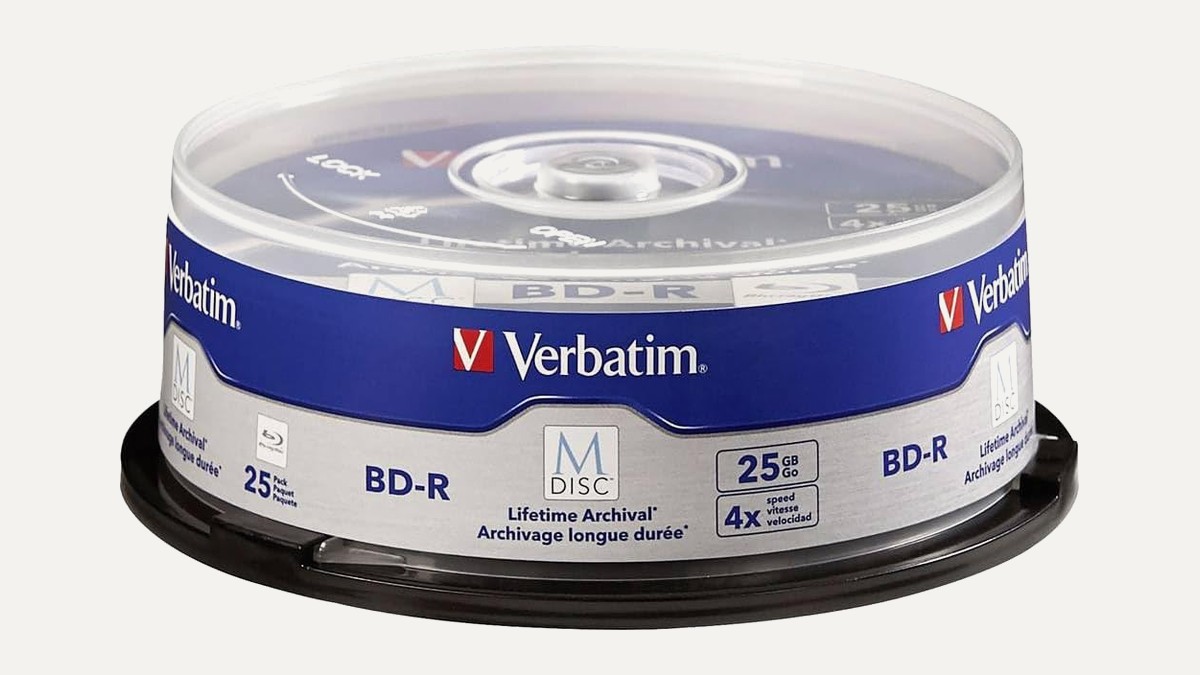
Live listing title: Verbatim M DISC BD-R 25GB 4X Archival Blu-ray Recordable Discs, 25 Pack.
The Verbatim M-DISC BD-R 25 pack (B011PZALWA) is the one to get if you’re archiving a real scanning project. Per the title, each disc is a 25GB Blu-ray recordable disc rated at 4X, and there are 25 in the pack. That’s room to split a large photo library by year or by family branch, burn a second set for a relative’s house, and still have spares. This listing was sold and shipped by Amazon.com when we checked.
Verbatim 43823 M-DISC BD-R 25GB, 5 pack: the starter pick
Live listing title: Verbatim 43823 25GB 4X M-Disc BD-R – 5 Pack Jewel Case.
The Verbatim 43823 M-DISC 5 pack (B00P870NES) is the same disc type, 25GB and 4X per the title, in a smaller pack with jewel cases. It’s a sensible way to try M-DISC with your drive before committing to a bulk pack. One important caution: this listing is an import, sold by Amazon Germany through the Amazon Global Store, and the listing notes that the manufacturer warranty may not apply. A US warranty may not cover it, and import terms can differ from a regular US listing, so check those terms before you buy.
Check your drive before you buy discs
This step matters more than which pack you pick. Verbatim says that to burn M-DISC media you need an M-DISC-ready drive. A drive that only says “Blu-ray writer” isn’t enough on its own, and a DVD-only drive can’t write a Blu-ray disc at all.
- Look for the M-DISC logo. Verbatim says M-DISC-ready drives often carry the M-DISC logo on the drive itself.
- Check the listing or spec sheet. Look for “M-DISC support” or “M-DISC BD-R” in the drive’s description or write-speed table.
- Ask the maker if you’re unsure. Verbatim’s own advice is to check with the drive manufacturer.
- Match the disc type. The picks here are Blu-ray (BD-R) discs, so you need a Blu-ray writer with M-DISC support.
Reading is easier than writing. Verbatim says most drives sold today should be able to read M-DISC media, though it again suggests checking with the drive maker. If your laptop has no disc drive at all, you’ll need an external one.
One burner option: archgon external USB 3.0 Blu-ray writer
Live listing title: archgon Premium Aluminum External USB 3.0 UHD 4K Blu-Ray Writer Super Drive for PC and Mac.
Blu-ray M-DISC burners are harder to find than they used to be. Pioneer has left the market: Pioneer USA says it has discontinued selling optical drives, and every Pioneer burner we checked on Amazon was currently unavailable. The archgon external Blu-ray writer (B07BC9F98J) was the one Blu-ray M-DISC burner we found in stock. Its listing says “Support M-DISC BD-R,” and its spec table lists BD-R SL (M-DISC) and DVD+R SL (M-DISC).
Two things to know. First, it’s sold and shipped by a third-party seller, Seatech Inc., not by Amazon or archgon directly, and delivery was about a week out when we checked. Second, Mac users: the listing says 4K UHD movie playback software is PC-only, so on a Mac it reads and writes regular Blu-ray, DVD, and CD, but doesn’t play UHD discs. For burning photo archives, that UHD limit doesn’t matter.
DVD-only alternative: LG GP65NB78
Live listing title: LG GP65NB78 8X USB 2.0 Super Multi Ultra Slim Portable DVD Writer Drive +/-RW External Drive with M-DISC Support – Black.
The LG GP65NB78 DVD writer (B0GJZFFM4S) lists M-DISC support, but it’s a DVD drive. It cannot burn the Blu-ray discs in this roundup. It only makes sense if you plan to use M-DISC DVDs, and both Verbatim M-DISC DVD packs we checked were currently unavailable. It’s still a handy reader if you just need to open old CDs and DVDs.
Which one should you get?
If you have a Blu-ray burner with M-DISC support, or plan to buy one, get the Verbatim M-DISC BD-R 25 pack for a full archive. Try the Verbatim 43823 5 pack first if you want to test your drive, keeping in mind it’s an import. If you need a burner, the archgon Blu-ray writer is one option from a third-party seller. Pick the LG GP65NB78 only for DVD work. Whatever you choose, keep the discs as one copy alongside a local external hard drive or portable HDD archive.
Frequently asked questions
Do M-DISC discs really last several hundred years?
That’s Verbatim’s claim. Verbatim says its M-DISC media has a projected lifetime of several hundred years based on ISO/IEC 16963 testing. We haven’t tested it, so treat M-DISC as one durable copy, not your only one.
Can any Blu-ray burner write M-DISC?
No. Verbatim says you need an M-DISC-ready drive to burn M-DISC media. Look for the M-DISC logo or M-DISC support on the listing, or ask the drive maker.
Can I read M-DISC discs in a normal drive?
Verbatim says most drives sold today should be able to read M-DISC media, but it recommends checking with your drive’s manufacturer. A Blu-ray disc still needs a Blu-ray drive to read it.
Is the 5-pack covered by a US warranty?
Maybe not. The Verbatim 43823 5 pack is an import sold by Amazon Germany, and the listing says the manufacturer warranty may not apply. Check the listing’s terms before you buy.
Where should I start with organizing what I’m archiving?
Sort first, then burn. Our complete guide to digitizing photos walks through the whole process.
Leave a Reply